FloorTone › Platform noise suppression
Before you buy a layer, audit the one you own
Built-In Noise Suppression in Contact-Center Platforms
The short version: every major contact-center platform now does something about background noise, but they do very different things. As of 18 Oct 2026, Genesys Cloud and Talkdesk lean on the browser's WebRTC noise suppression, which is on by default and cleans the agent's microphone. Amazon Connect added a proper two-mode Audio Enhancement in February 2026, again for the agent side. NICE CXone sells AI Noise Cancellation for both sides of the call as a separately licensed option. Five9 documents no native agent-side feature that we could find and points to marketplace partners. Know which of these you already have before you price a third-party layer.
Platform facts on this page come from each vendor's own help documentation and announcements. Platform features change with releases; check your own admin console before acting on any line here.
The matrix: what each platform ships
Three questions sort the five platforms. Is there a native control at all? Which side of the call does it clean: the agent's microphone, the caller's audio, or both? And how do you get it: is it already running, does an admin switch it on, or is it a separate licence or a partner app? The grid answers those questions from each vendor's own pages.
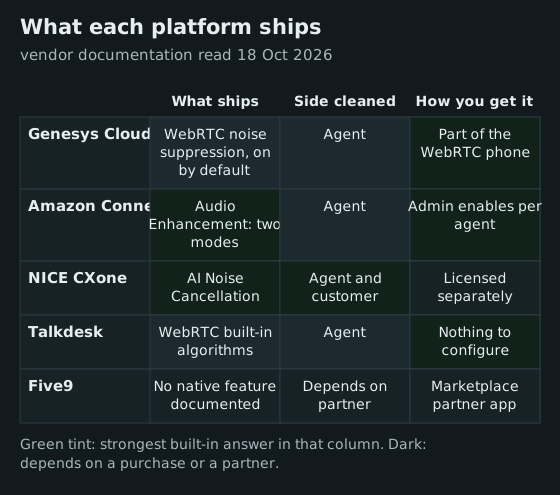
The column that changes buying decisions is the middle one. Three of the four native options (Five9 documents none) clean only what the agent sends. That is the half your clients and QA hear, so it is the half that gets complaints, but it does nothing for the agent straining to hear a caller in a car. Only NICE's add-on, among the built-ins, documents the customer side; everywhere else the inbound half needs a separate layer. We cover why that half matters in two-way noise cancellation.
Genesys Cloud: WebRTC noise suppression and its limits
Genesys Cloud's WebRTC phone applies the browser's standard audio processing by default. Its help article on advanced microphone settings lists three of those defaults (Automatic Mic Gain, Echo Cancellation and Noise Suppression) and describes Noise Suppression simply as something that "removes background noise". In Chrome, an agent can clear any of the three under the WebRTC settings; Genesys notes that the Advanced Mic Settings option "only appears in Chrome browsers". The article applies to the Embeddable Framework and to Genesys Cloud for Chrome, Microsoft Teams, Salesforce and Zendesk.
That makes Genesys's built-in a sensible floor, not a ceiling. Browser noise suppression is tuned for steady sounds such as fans and hum. Genesys's own advice is telling: if the microphone cannot separate the voice from the noise, move the microphone closer and speak louder before you clear the option. There is no voice-isolation mode for the colleague talking at the next desk, and nothing for the caller's side. For an open floor, that gap is the whole problem; our open-floor guide covers the operational fixes that sit alongside software.
Amazon Connect: Audio Enhancement since February 2026
AWS announced Audio Enhancement for Amazon Connect on 11 February 2026, available in every commercial Region where Connect runs. It has two modes. AWS's announcement says "Voice Isolation" "suppresses noises as well as background speech within the contact center", while "Noise Suppression" "only suppresses background noises". It is off by default; administrators switch it on agent by agent in User management, and agents can change their own mode in the Contact Control Panel only if their security profile includes the Audio device settings permission.
The administrator guide adds the conditions that matter for rollout: softphone users only, a minimum four-core CPU (or 4 vCPU on virtual machines), and no support for VDI deployments that use Connect's audio optimisation. AWS reserves the voice-isolation mode for agents on wired headsets. The processing improves what the customer hears from the agent; the documentation describes no customer-side cleanup. We found no separate line for it on the Amazon Connect pricing page we read the same day.
NICE CXone: AI Noise Cancellation as a licensed add-on
NICE is the only platform of the five that documents both directions natively. In its help centre, AI Noise Cancellation can work on the agent's audio, the caller's audio or both at once, and each side gets its own on/off control and intensity slider in the agent's settings. NICE's marketing calls the product SmartSpeak.
Three conditions come with it. Your account representative has to turn it on. Most agents need a NICE browser extension installed; Agent Workspace for Salesforce Voice uses a tab instead, and other agent applications are not supported. And NICE states that the feature carries its own licence. So on CXone the honest comparison is NICE's licence against a third-party layer, not built-in against paid.
Five9 and Talkdesk: browser defaults and partner layers
Talkdesk's support article on background noise (last updated 18 May 2026) says both its browser and desktop apps "leverage the WebRTC audio stack, which includes built-in algorithms for noise and echo cancellation, meaning no additional configuration is required". It adds that effectiveness "may vary depending on the browser version, operating system, and hardware", and warns against overlapping processing from operating systems and headsets. That is an honest description of a browser default, with no agent-facing control and no customer-side cleanup.
For Five9 we found no first-party documentation of a native noise feature for human agents as of 18 Oct 2026. The route on Five9 is a partner: IRIS Clarity says it is listed on the Five9 Marketplace, and Krisp lists Five9 among the platforms it works with. If your Five9 account team tells you otherwise, ask for the documentation and date it.
When a platform-agnostic layer still wins
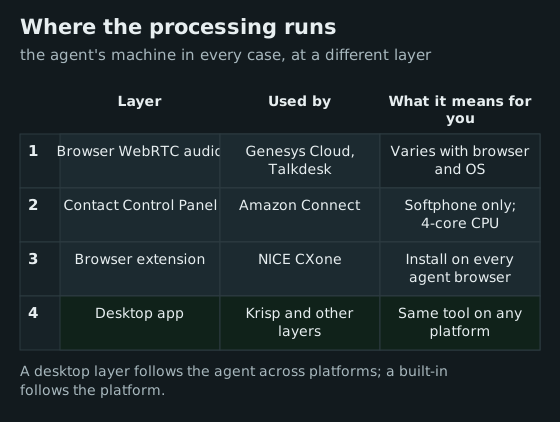
Built-ins win on price and simplicity, and you should switch on the best one you have before buying anything. A separate agent-side layer earns its seat cost in four situations:
- You run more than one platform. BPOs serving several clients often log agents into different stacks. One desktop layer gives every queue the same audio standard; built-ins give you as many standards as platforms.
- You need the caller's side cleaned. Outside NICE's licensed option, none of the built-ins documents inbound cleanup.
- Your floor is loud with voices, not hum. Browser noise suppression targets steady noise. Amazon's Voice Isolation mode is the only built-in aimed at neighbouring speech, and it wants wired headsets.
- Your desktops are virtual. Amazon's mode does not support Connect's VDI audio optimisation, and browser extensions add a deployment step on locked-down images.
The commercial check is simple: Krisp’s CC Core bundles three things, cleanup of both call directions and isolation of the agent’s voice, for $15 per agent per month on annual billing, which is $180 a seat a year. Set that against NICE's quote if you are on CXone, or against nothing if your built-in is already good enough on your noisiest queue. Our handle-time model shows how to put a value on the difference.
A one-week audit before you buy
Before any procurement call, run the built-in properly for a week on one noisy queue. Switch on the strongest native mode you have (Voice Isolation for wired-headset agents on Connect, NICE's agent and contact sliders if licensed, and Genesys or Talkdesk defaults left on). Tag repeat requests, "can you hear me" moments and client audio complaints using the defect codes in our audio quality metrics. Then run a third-party layer on a matched queue for the following week, with the built-in switched off so the two are not stacked. Talkdesk's own guidance warns that multiple layers of processing can reduce quality, and it is right.
While the week runs, put five questions to your platform account team in writing, and ask for documentation rather than a demo:
- Which side of the call does your noise feature process: the agent's microphone, the customer's audio, or both?
- Is it on by default, switched on by an admin, or a separately licensed option, and what does it cost per seat?
- Which agent applications, browsers and virtual-desktop set-ups does it support, and which are excluded?
- Does it remove neighbouring voices, or only steady noise such as fans and traffic?
- Are recordings and transcripts made before or after the processing, so we know what QA and analytics hear?
The last question matters more than it looks: if suppression is applied before capture, your speech analytics inherit the cleaner audio too.
If the built-in week is close to the layer week, stop there and spend the money elsewhere. If it is not, you now have numbers from your own floor to put in front of finance, which beats any vendor's percentages.
Questions ops teams ask
Which contact-center platforms have built-in noise suppression?
As of 18 Oct 2026: Genesys Cloud and Talkdesk use WebRTC noise suppression by default, Amazon Connect has Audio Enhancement (since February 2026), and NICE CXone offers AI Noise Cancellation as a separately licensed option. We found no native Five9 feature for human agents.
Does built-in suppression clean the customer's background noise?
Only NICE CXone's AI Noise Cancellation documents a customer-side control. The other built-ins process the agent's microphone, so callers in noisy places reach your agents unfiltered.
Can we run a third-party layer on top of the platform's suppression?
You can, but test before stacking. Two suppressors in a row can thin or warble a voice; pick one per direction and switch the other off during your pilot.
Is Amazon Connect's Audio Enhancement free?
AWS's announcement and administrator guide describe no separate charge, and we found none on the pricing page on 18 Oct 2026. Confirm with your AWS bill or account team before you plan around it.
What should a BPO on several platforms do?
Switch on each platform's best built-in, then decide whether one agent-side layer across every client stack is worth its seat cost against your noisiest queues. Measure it with your own QA tags, not vendor claims.